The Moodle plugin builder, checked by Moodle's own tools
Moodle plugins, built in days.
Describe the plugin and attach your spec or a screenshot. Watch it get written, run it in a real Moodle in your browser, and take the code once it passes.
- 40 free credits, no card
- Moodle 4.5 LTS to 5.x
- Your code, GPL, ready to install
Built in front of you. Checked before you take it.
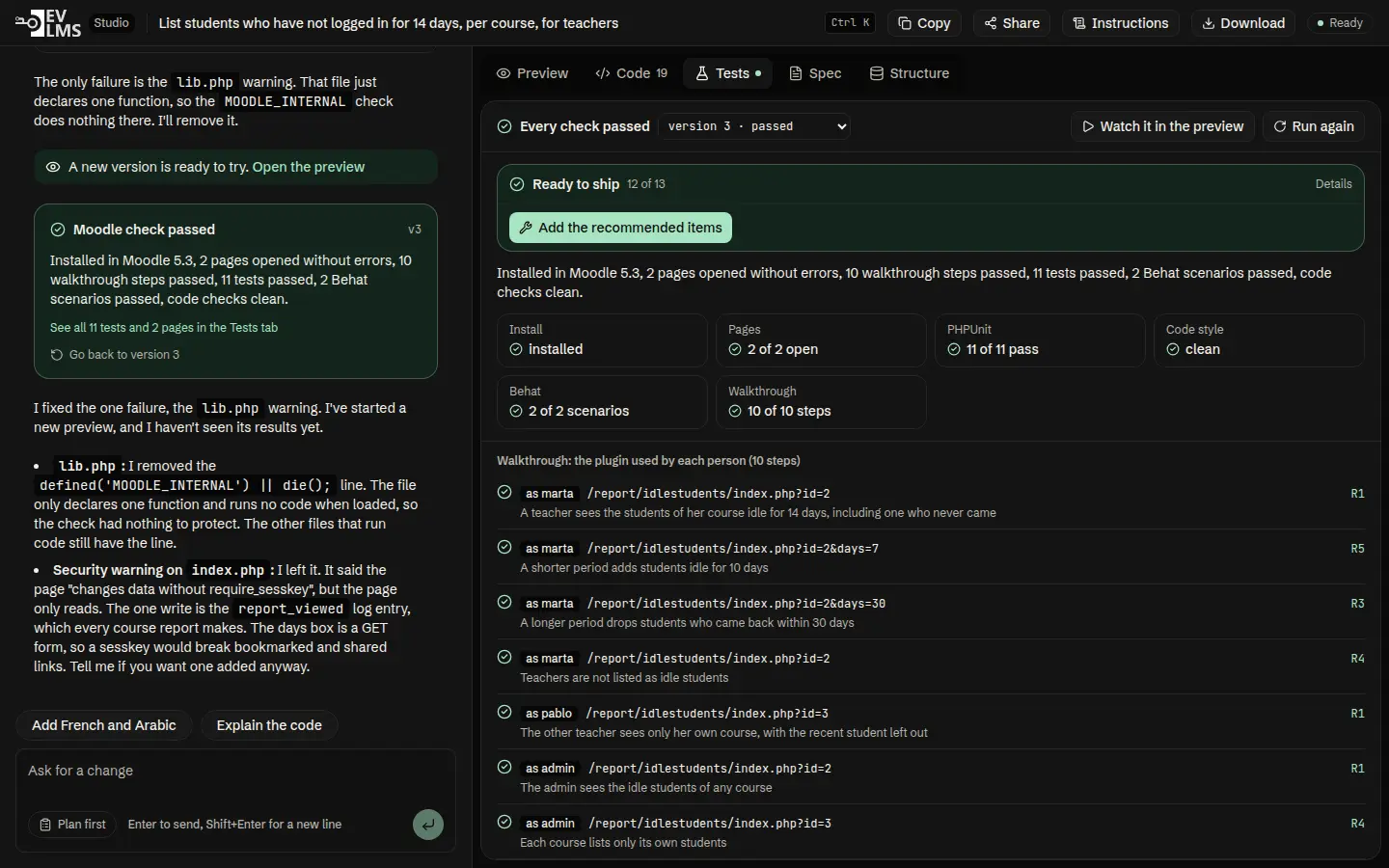
On the left, the builder explains what it wrote and why. On the right, the plugin runs in Moodle, with every check it passed. This is a real build: a report of students who have not logged in for 14 days.
From a sentence to a plugin that passes.
Most plugins pass on the first build. When a check fails, the builder reads why and fixes it on its own.
- 01
Describe it
Say who uses the plugin and what they should see. Attach a spec or a screenshot.
- 02
Agree the plan
Plugin type, tables, permissions and pages come back as a plan. Nothing is written until you say go.
- 03
Watch it built
Each file appears as it is written. Moodle installs it and runs every check, then the builder fixes what failed.
- 04
Take the code
Download the zip once it passes, ready for your site or the Moodle plugins directory.
A real Moodle. In your browser.
The preview is Moodle itself, with courses, teachers and students already in it. Open the plugin as each of them and click through. Nothing to install, nothing on your server.
Moodle's own checks. Not the AI's word for it.
Every version is installed in a clean Moodle, every page is opened, and each person in the plan walks through it. Then PHPUnit, Behat and the Moodle code checker run, the same tools the plugins directory uses.
- Install installed
- Pages 2 of 2 open
- Walkthrough 10 of 10 steps
- PHPUnit 11 of 11 pass
- Behat 2 of 2 scenarios
- Code style clean
About 3.5 minutes for a full check, on our servers, at no cost to you.
Bring your spec. Or a picture of the screen.
Attach the document your team already wrote, or a screenshot of the report you want. The builder reads the spec and works from a description of every picture: labels, columns, buttons.
Everything a plugin needs. Nothing you have to set up.
The studio keeps the work tidy, so a plugin you build today is still easy to change next year.
-
Plan first
The builder answers with a plan and waits for your yes before it writes anything.
-
Every version kept
Each version that passed is a checkpoint. Go back to one in a click.
-
Start from your plugin
Upload the zip of a plugin you already have and ask for the change.
-
Share a read-only link
Show a client or a colleague the plugin, its latest check and its code.
-
Moodle 4.5 LTS to 5.x
Pick the Moodle version to run it on. The checks run on the one you pick.
-
Your code, GPL
A clean zip with tests, language strings and privacy API. No lock-in.
Our team, when you need it
Senior Moodle developers take your build and finish it, or build the whole plugin for you. A fixed price before any work starts.
- Payment gateways
- Integrations with your school systems
- Installs and upgrades on your site
Start free. Pay when you ship.
Credits pay for the builder's work. The Moodle preview and every check are included on every plan. Need more? 500 extra credits cost $10 and never expire.
-
Free
$0
40 credits, once
Enough for a first plugin on the standard builder.
Start free -
Pro
$29 a month
1,500 credits each month
The stronger builder, for plugins you ship.
Choose Pro -
Team
$99 a month
6,000 credits each month
For agencies building plugins for clients.
Choose Team
Before you start
How is this different from Lovable, Bolt, v0 or Replit?
Those build web apps. DevLMS Studio builds Moodle plugins and nothing else. The code runs inside a real Moodle, and every version is installed and tested with Moodle's own tools (PHPUnit, Behat and the Moodle code checker) before you download it.
Do I need to know how to code?
No. You describe what teachers, students or managers should see, and you test it in the Moodle preview. Developers get the full source and can read every change.
What can I attach?
Up to 5 files of 5 MB each: written specs (PDF, Word, text or Markdown) and pictures such as a screenshot or a sketch of the screen you want. Specs are read as text. Pictures are described in words for the builder.
What do 40 free credits get me?
Enough for a first small plugin with a round of fixes on the standard builder. Previews and Moodle checks never cost credits.
Who owns the plugin?
You do. Plugins are GPL, as Moodle requires, and you download the full source.
What if the builder gets stuck?
Our team takes the build and finishes it for a fixed price: payment gateways, integrations with your school systems, installs on your site.