
Our work / Open source
Autoflow
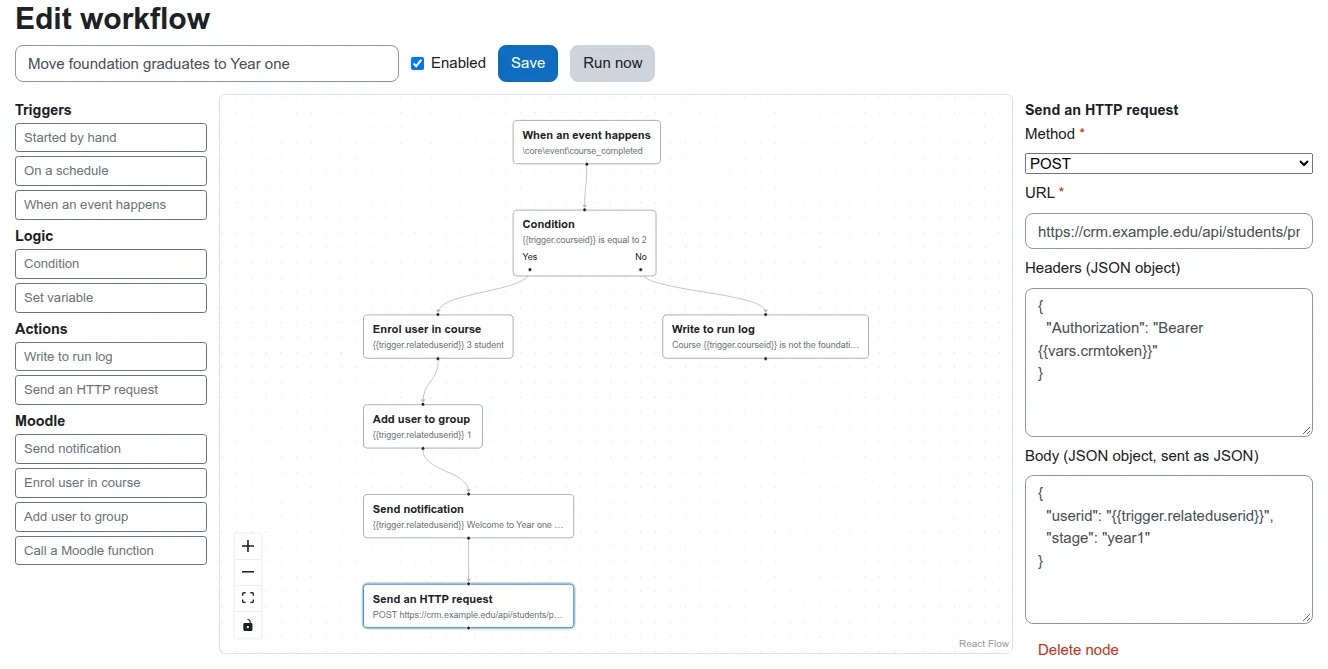
Workflow automation inside Moodle. Pick a trigger, wire up steps in a node editor, and Moodle runs it on its own. Think n8n or Zapier, but with Moodle's permissions, events and logs. We built it in public, and every test report is online.
- 4.5 to 5.3 Moodle versions, on PHP 8.1 to 8.4
- GPL v3 free to use and change
- Alpha try it on a test site first
Why build it?
Every school on Moodle has a list of small automations. Email a student who falls behind. Enrol people in the next course when they finish this one. Tell the CRM when someone signs up. Today each one is a custom plugin, a code review, and another thing to upgrade. Autoflow turns those into workflows an administrator can build and change without a developer.
What can a workflow do?
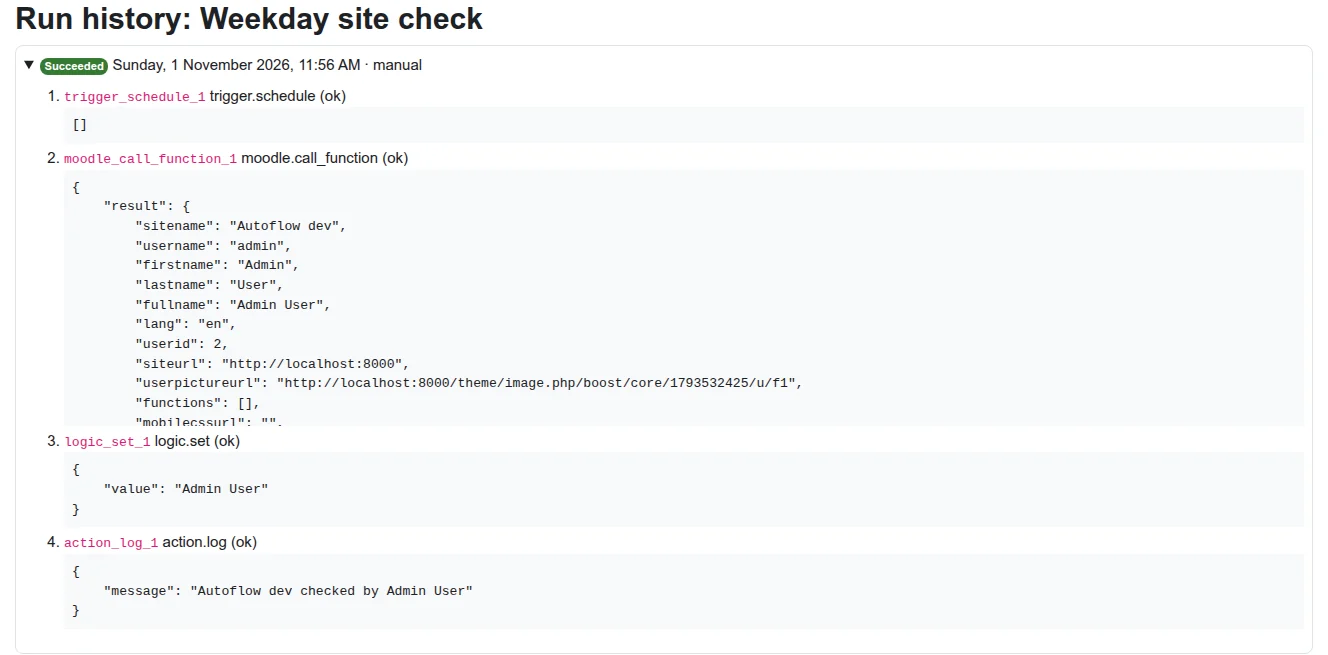
Each workflow has one trigger and any number of steps. A condition splits the path in two. Every run is saved with the output of each step, so you can see exactly what happened.
- Triggers. Started by hand, on a schedule (cron in the site's timezone), or when any Moodle event happens: a user is created, a course is completed, a quiz is submitted.
- Logic. A condition with Yes and No branches, and variables that later steps can read.
- Moodle actions. Send a notification, enrol a user in a course, add a user to a group.
- Any Moodle web service function. One node that calls any function installed on the site, which is most of the Moodle API, with arguments as JSON.
- Other services. An HTTP request node for CRMs, student systems, chat tools and anything else with an API.
- Placeholders. Any setting can use data from the trigger or an earlier step, such as {{trigger.relateduserid}}.
How do you keep automation safe?
A tool that lets admins call Moodle functions and other services needs hard limits. These are built in, and each one has a test.
- Runs with real permissions. A workflow runs as the person who saved it last. Every Moodle step goes through the same capability checks as Moodle's web services, so a workflow can never do more than that person could do by hand.
- Trigger data can't rewrite a step. Placeholder values are filled into each setting on their own, never pasted into JSON text, so a user name full of quotes and braces stays a user name.
- Outgoing requests respect the site. HTTP requests use Moodle's own curl class, so the site's blocked hosts and ports apply to the first URL and to every redirect. Local and private addresses are blocked by default. Requests time out and answers are capped.
- Events never slow a page. One listener catches every event with a single cached lookup. The workflow runs later, in a background task.
- Loops stop. A workflow whose own action fires its trigger again stops after three levels.
- Mistakes are caught on save. No trigger, a loop, an unconnected node, a bad cron line or an empty required setting: the workflow is kept as a disabled draft and the editor marks the problem.
How is it tested?
Every push runs the full set below, and the reports are published. These badges show the latest run, not numbers we typed in.






| Layer | What runs |
|---|---|
| Moodle checks | moodle-plugin-ci: lint, code style, PHPDoc, Mustache, Grunt, savepoints, validation |
| PHP unit and integration tests | PHPUnit on Moodle 4.5, 5.1, 5.2 and 5.3, with PHP 8.1 to 8.4, on PostgreSQL and MariaDB |
| Behaviour tests | Behat scenarios that drive the plugin's pages in a real Moodle |
| Mutation testing | Infection on the PHP engine and Stryker on the editor: the code is changed on purpose, and the tests must notice |
| Editor tests | Vitest and Testing Library, with coverage |
| End to end | Playwright builds a workflow in the editor, saves it, runs it through Moodle's task queue and reads the run log |
Client plugins get the same checks. See what "done" means.
How is it built?
It's a Moodle admin tool (tool_autoflow). The workflow engine is plain PHP with no Moodle
calls, which keeps it fast to test and lets mutation testing run thousands of times. The editor is React
and React Flow in TypeScript, bundled into one file, so it never clashes with the React that Moodle 5.2
and later use for their own pages.
- Next up. Choosing the run-as user, more Moodle steps (grades, cohorts, course actions) and loops over lists.
- Try it. Install it on a test site from the GitHub repository. Issues and pull requests are welcome.