
Our work / Open source
Academic integrity cases for Moodle
A Moodle plugin that tracks academic misconduct cases from the first report to the final decision. Staff investigate privately, the student gives their side, the handler records an outcome, and the student can appeal. Every step is on record. It is free and open source.
- 4.5 to 5.3 Moodle versions, on PHP 8.1 to 8.4
- GPL v3 free to use and change
- Alpha try it on a test site first
What happens after Turnitin flags a submission?
Usually, email. Turnitin, Originality.ai, Copyleaks and the other detectors put a score next to a submission, and every one of them says a score is not a finding. Someone still has to look into it, ask the student, decide, and handle the appeal. In most schools that lives in inboxes and spreadsheets, where it is hard to be fair, consistent or ready for a data request.
When we checked the Moodle Marketplace in November 2026, nothing tracked the case itself. There are detectors, proctoring tools and an integrity statement students click to accept. So we built the missing part, inside the course, with Moodle's permissions, notifications, logs and privacy tools.
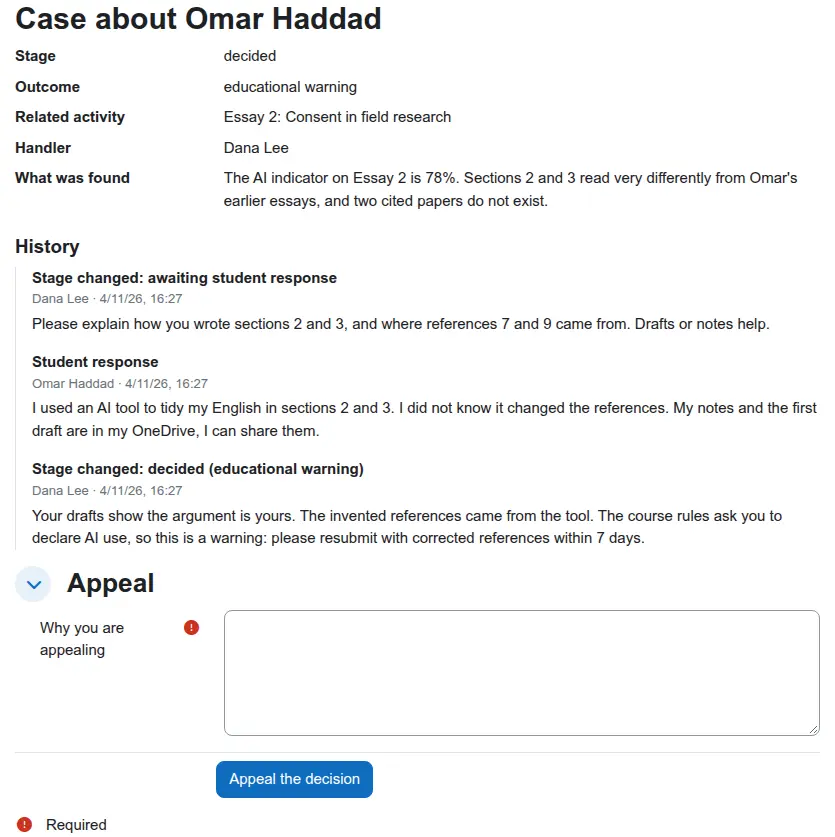
How does a case move from report to appeal?
Six stages. The server only allows sensible moves: a case can't be decided before someone investigates, and only the student can appeal. A decision always needs one of five outcomes: no case to answer, educational warning, resubmission required, mark reduced, referred to a panel.
| Stage | What happens | Student sees it? |
|---|---|---|
| Reported | A teacher opens the case: the student, the activity, what was found, and evidence files. | No |
| Investigating | Staff look into it. Private notes and evidence stay with staff. | No |
| Awaiting student response | The student is told what was found and asked for their side. | Yes, from here on |
| Decided | The handler records an outcome and the reasons. | Yes |
| Appealed | The student appeals from the case page. The handler is told. | Yes |
| Closed | Finished. A closed case can be reopened if new evidence turns up. | If it was visible before |
Who can see and do what?
Four capabilities, set per course like any Moodle permission. These are the defaults.
| Role | Can |
|---|---|
| Teacher, manager | Open cases, move them, record decisions, add private notes and evidence |
| Non-editing teacher | See every case in the course |
| Student | See their own case once it is visible, respond, appeal |
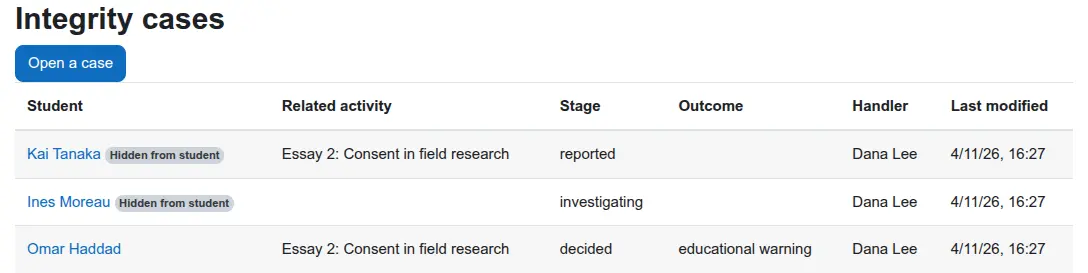
| Site manager | Build site-wide reports on cases with Moodle's report builder |
What goes on the record?
Everything, with who did it and when. That is what makes a decision defensible.
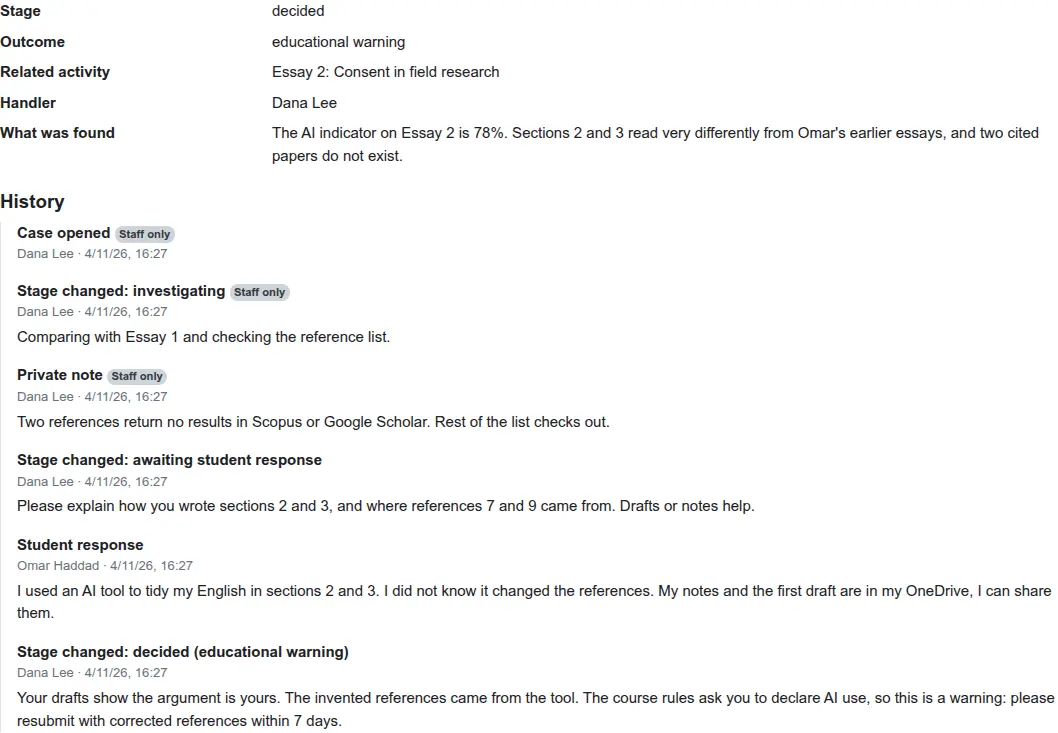
- An audit trail. Every stage change, note, response, appeal and evidence upload is a row with its author and time, and whether the student can see it.
- Notifications. The student hears about each stage they can see. The handler hears when the student responds or appeals. Both go through Moodle's own messaging, so email and app notifications follow each user's settings.
- Moodle logs. Opening and updating a case are logged events, so they show in the course logs.
- Privacy. Moodle's privacy API covers cases, history and evidence files for export and deletion.
- Reports. A report builder source, "Academic integrity cases", gives site managers counts by course, stage and outcome. Nobody else can use it.
How is it tested?
PHPUnit covers the stage rules, every action and its permission checks, the privacy provider and the report source. A Behat scenario walks a case from report to appeal in a real browser, as teacher and student, and checks the student never sees the private note. CI runs it on Moodle 4.5 to 5.3, on PostgreSQL and MariaDB.


Client plugins get the same checks. See what "done" means.
Questions people ask
Does this plugin detect AI writing or plagiarism?
No. It is the next step after detection. Use it with Turnitin, Originality.ai, Copyleaks, Compilatio or any other detector, or with a teacher's own judgement. A flag starts a case; the plugin tracks what happens next.
Can students see a case while it is being investigated?
No. A case stays hidden from the student while staff look into it. It becomes visible the first time the student is asked for their side or told a decision. Private staff notes are never shown to the student, even after that.
Can students respond to and appeal a decision in Moodle?
Yes. When a case is waiting for their response, the student writes it on the case page. Once a decision is recorded, they can appeal from the same page, and the staff member handling the case gets a notification.
Which Moodle versions does it support?
Moodle 4.5 to 5.3, on PHP 8.1 to 8.4, with PostgreSQL or MariaDB/MySQL. Every push is tested on that range.
How does it handle GDPR and data requests?
It implements Moodle's privacy API. A student's export covers whole cases about them, including staff notes and evidence. A staff member's export covers their own actions. Deleting a staff member's data keeps the case on record and removes their name.
Is it free?
Yes. It is open source under the GNU GPL v3, like Moodle. If your policy needs different stages, panels, deadlines or a link from the grading page, we can build that for you at a fixed price.
Need it to follow your institution's policy?
Different stages, a panel that decides, deadlines for the student, a link from the grading page, reports for your quality office. We build that on top of this plugin at a fixed price.
Get a fixed priceBacked by Ta9in.