
Our work / Open source
Notification hub, for Moodle
One place to decide how Moodle reaches people. Each notification goes out once, through the first channel the student has set up: the phone app, then SMS, then email, in the order you choose. When a channel fails, the next one is tried. The hub page shows what was delivered, what failed, and how your SMS gateways and email are doing. It is free and open source.
- 4.5 to 5.3 Moodle versions, on PHP 8.1 to 8.4
- GPL v3 free to use and change
- EN, FR, AR English, French and Arabic
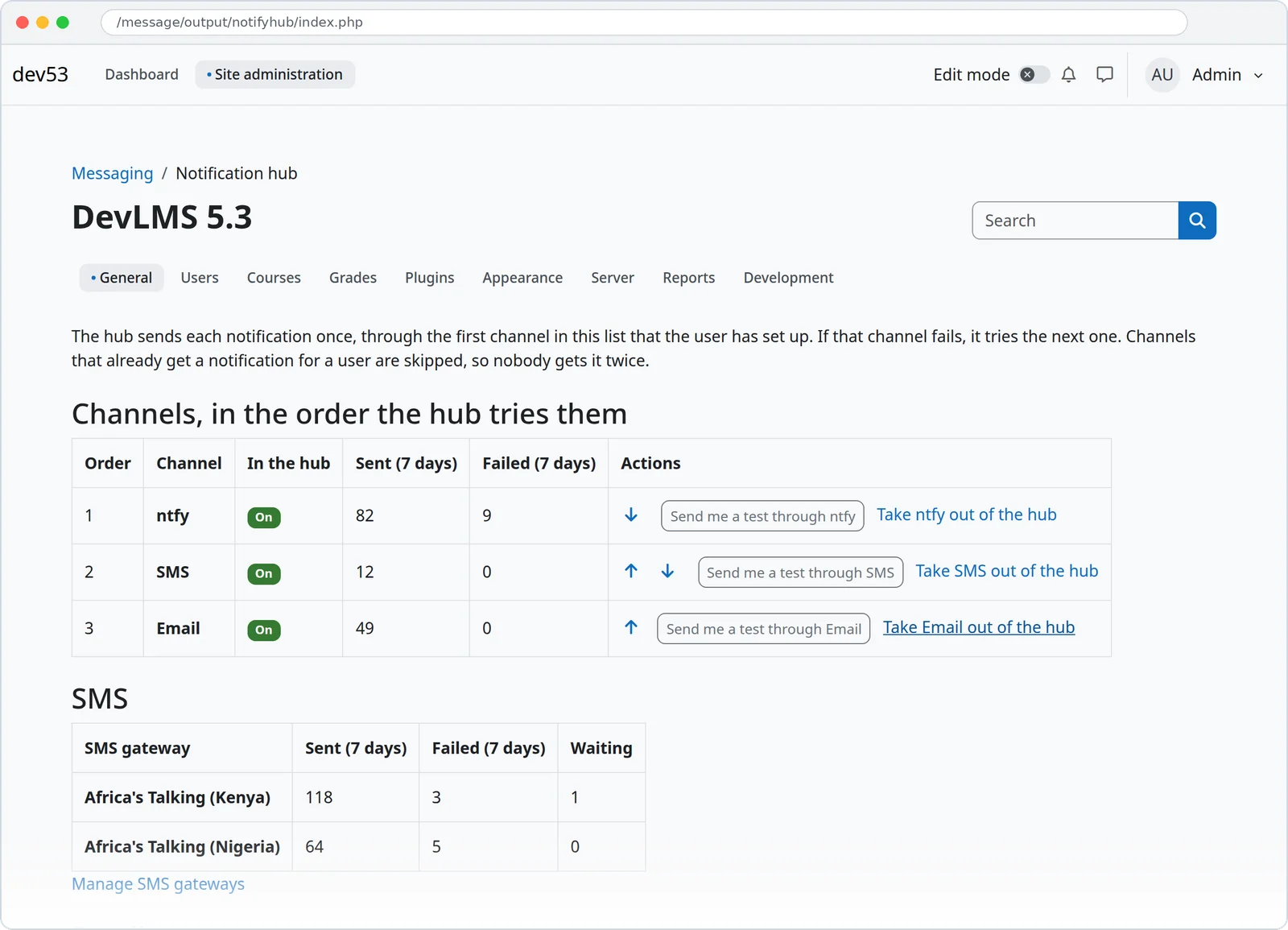
Why does Moodle need a notification hub?
We read how Moodle 5.3 sends notifications. It hands each one to every output the user has switched on and ignores what they answer: a failed push or SMS only leaves a debugging message. So a student with the app and email gets two copies, and a student whose app channel is broken gets nothing, and nobody sees it. The plugins directory has channels (Telegram and Slack stop at Moodle 3.x) and SMS gateways, but nothing that picks the channel per student, falls back, or shows delivery per channel. The hub does that by being a Moodle output itself, so it sees every answer.
How does it work?
- Turn the hub on. In Notification settings, switch on Notification hub, then turn it on (and the other channels off) for the notifications it should deliver: assignment feedback, forum posts, grades, anything Moodle sends.
- Put the channels in order. On the hub page, order the channels the way you want them tried, for example the ntfy app first, then SMS, then email. Take out any channel you do not want the hub to use.
- Students set up what they use. Each student sets up their channels as usual: an ntfy topic in Notification preferences, a mobile phone number in their profile for SMS. Email needs nothing.
- One copy, on the first channel that works. For each student the hub skips channels they have not set up, sends through the first one left, and stops when that channel confirms delivery. If it fails, the next channel is tried.
- See what happened. The hub page shows sent and failed per channel for the last 7 days, SMS results per gateway, emails Moodle could not send, and the latest deliveries. Send yourself a test through any channel.
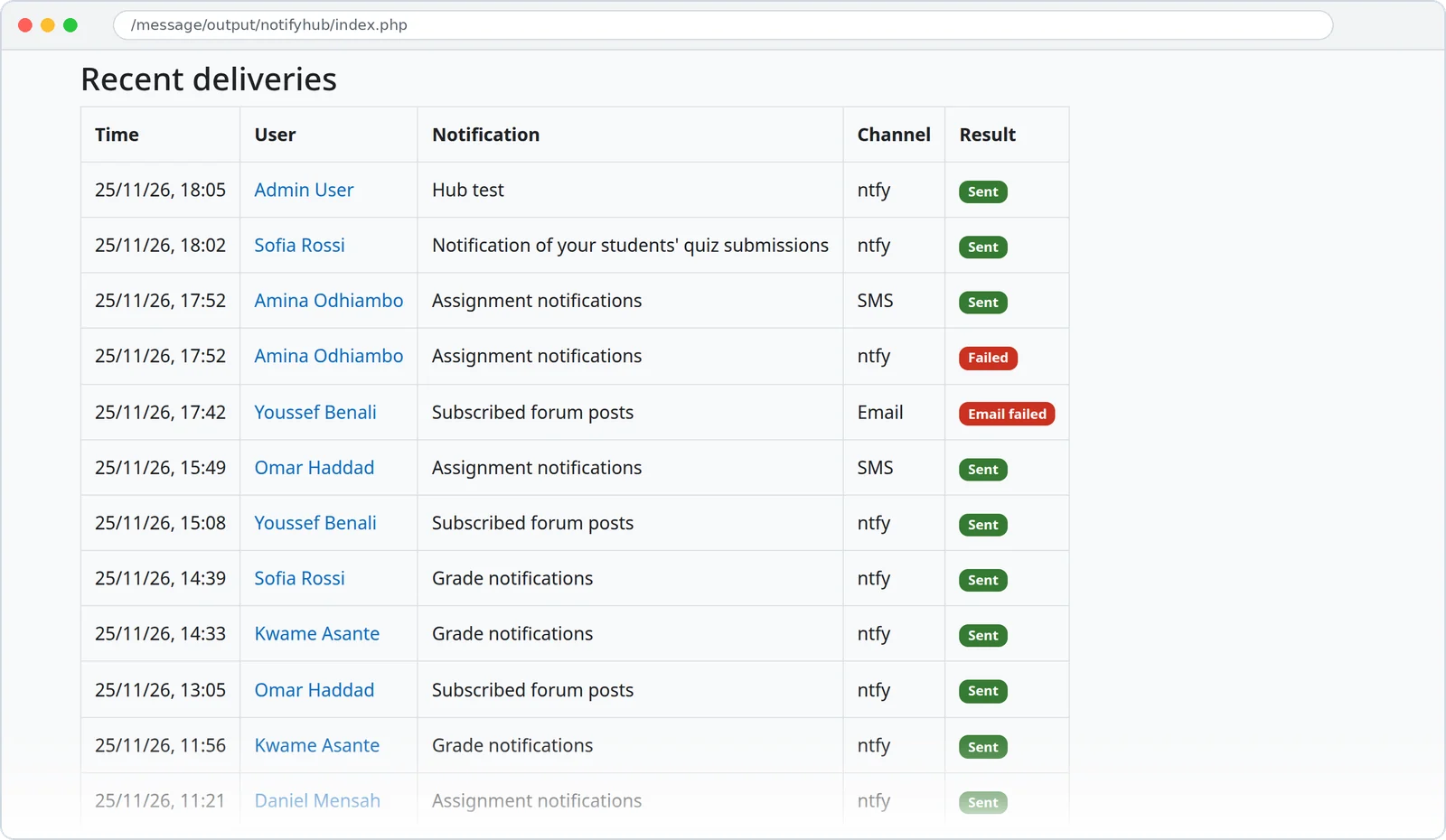
How does the hub choose a channel?
It goes down your list for each student and each notification, and stops at the first channel that delivers.
| Case | What the hub does |
|---|---|
| Not set up | A channel the student has not set up (no ntfy topic, no phone number) is skipped, never tried. |
| Already getting it | If a student already gets that notification on a channel (their own preference or one the admin forced), the hub adds nothing, so nobody gets it twice. |
| Failed | A channel counts as delivered only when it confirms. A failure is logged and the next channel is tried. |
| Nothing worked | The hub logs it as not delivered and fires an event, so a report or an Autoflow workflow can follow up. |
- SMS stays with Moodle. Moodle already picks an SMS gateway by country code, so the hub shows each gateway's results instead of routing SMS a second time.
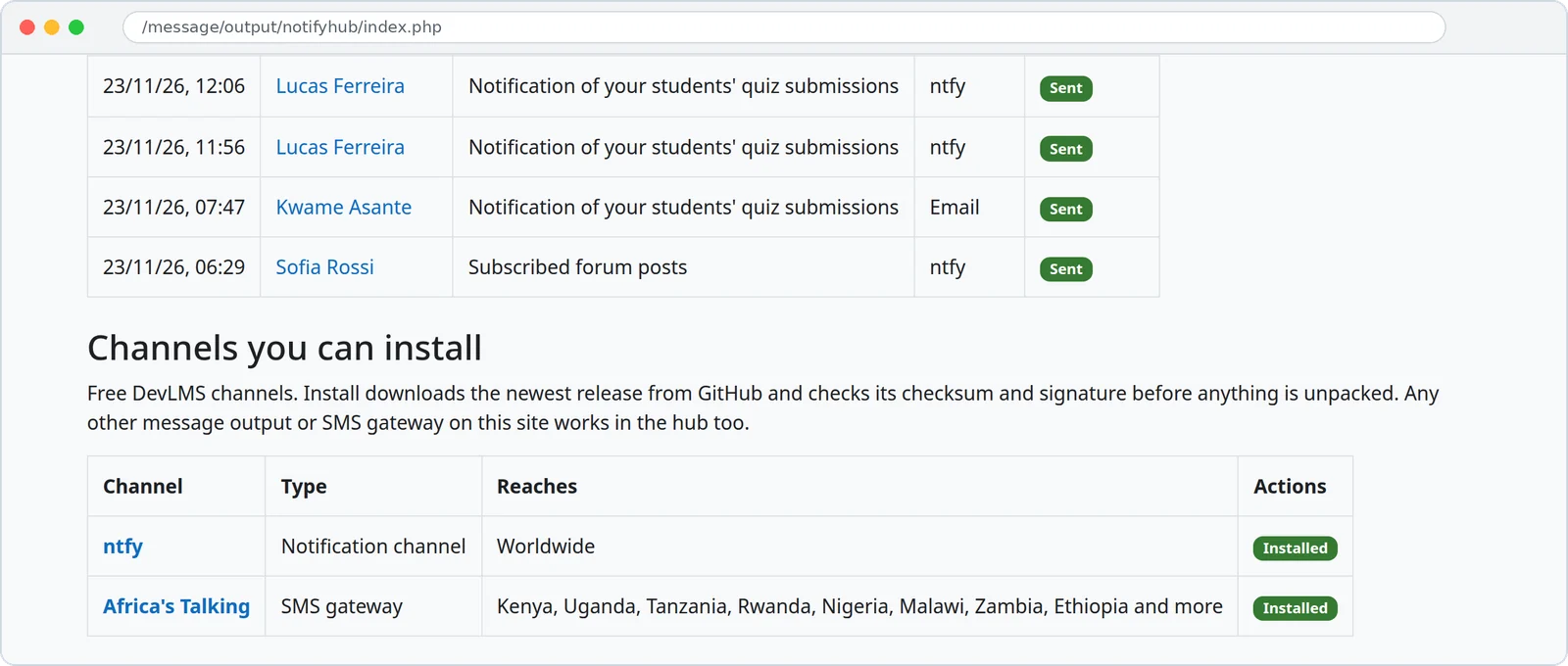
- Installs are checked. Free DevLMS channels install from the hub page only when the download matches the SHA-256 GitHub publishes for the release and carries the DevLMS signature, the same rules as our payment hub.
- Works with any output. Third-party message outputs and SMS gateways need no changes to work in the hub.
How is it tested?
PHPUnit covers the order and the fallback, skipped channels, a real Moodle send through the hub with an email sink (one email, not two), the log never holding message text, failed emails, SMS counts from Moodle's own table, the installer refusing a wrong checksum, a missing signature or another plugin's zip, and the privacy provider. A real Moodle send goes by SMS through a test gateway, and falls back to email when the student has no mobile number or the notification has no SMS text. Behat takes a channel out of the hub and puts it back, sends a test, and checks the page meets accessibility standards. CI runs on Moodle 4.5 to 5.3, on PostgreSQL and MariaDB.


Questions people ask
How do I stop Moodle sending the same notification by email and by app?
Moodle sends a notification to every output a user has on, so a student with email and an app gets two copies. With the notification hub you turn the hub on for that notification instead of each channel. The hub sends one copy, through the first channel in your order that the student has set up, and falls back to the next if it fails.
Can Moodle send an SMS when the app notification fails?
Yes, with the hub, on Moodle 5.0 and later. Put the app channel first and SMS second. If the app channel does not confirm delivery, the hub sends the same notification through Moodle's SMS output and your SMS gateways. Moodle only sends an SMS when the notification comes with SMS text and the student has a mobile number in their profile; in Moodle 5.3 core that is Assignment notifications. For other notifications the hub skips SMS and goes on to email. Core Moodle cannot fall back at all: it ignores what each output answers.
Does it log the message text?
No. The log keeps who, which notification type, which channel, the result and the time. SMS can carry sign-in codes, so text is never stored. Rows are removed after 30 days by default, and Moodle's privacy export and deletion include them.
Which channels does it work with?
Any message output on the site: email, Moodle's SMS output (Moodle 5.0 and later), ntfy, and third-party outputs. The hub page can also install free DevLMS channels (ntfy, Africa's Talking SMS) after checking each release's checksum and signature.
Does it check why our email goes to spam?
No. It counts emails Moodle could not send and links to Moodle's test email page. SPF, DKIM and DMARC checks are what the free Mail health plugin (tool_mailhealth) does well, and the hub links to it.
Which Moodle versions does it support?
Moodle 4.5 to 5.3, on PHP 8.1 to 8.4, with PostgreSQL or MariaDB/MySQL. English, French and Arabic.
Need WhatsApp, Telegram, Teams or your local SMS provider?
Each channel is its own small plugin that the hub can install. We build the channel your students actually use, or connect your SMS provider, at a fixed price.
Get a fixed priceBacked by Ta9in.