
Our work / Open source
Browser notifications, for Moodle
Moodle notifications as pop-ups from the student's browser, even when Moodle is not open. No app to install and no account with Firebase or OneSignal: it uses the Web Push standard built into the browser. Each notification is encrypted for one browser, and each browser confirms what it shows, so the notification hub can switch to email when a browser goes quiet. Free and open source.
- 4.5 to 5.3 Moodle versions, on PHP 8.1 to 8.4
- GPL v3 free to use and change
- EN, FR, AR English, French and Arabic
Why browser notifications for Moodle?
Many students never install the Moodle app and rarely read school email, but they keep a browser open all day. Core Moodle shows notifications in the bell only while a Moodle page is open. The plugins directory has push outputs tied to one vendor (TwinPush, Pushover), and none that use the browser's own push. We read RFC 8030, 8291 and 8292, Apple's and Mozilla's notes, and built it with PHP's OpenSSL only: no SDK, no composer library, no third-party account.
How does it work?
- Turn it on for the site. In Notification settings, switch on Browser notifications and choose which notifications it may send. The site makes its own push keys the first time. There is nothing to sign up for and no service to pay.
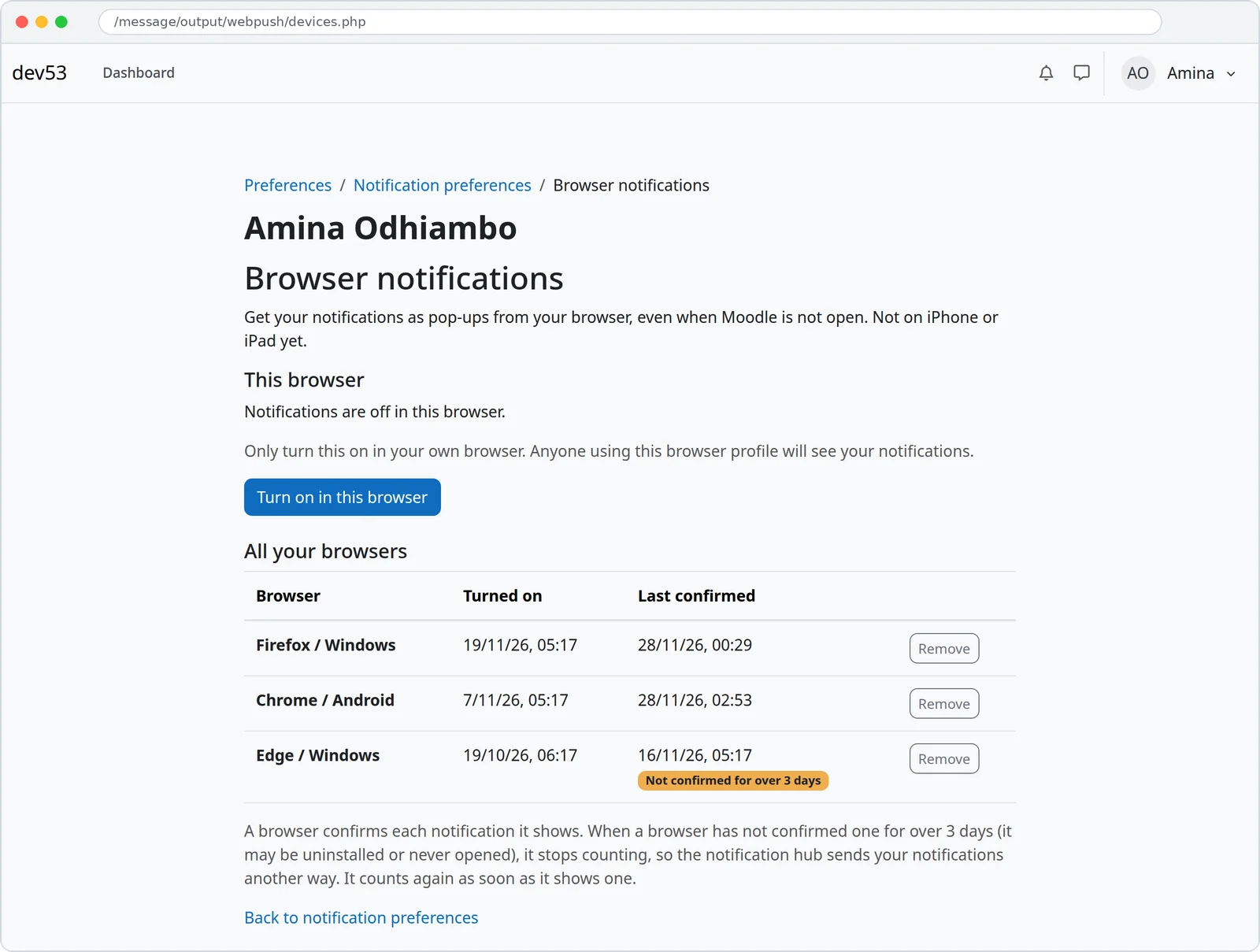
- Students turn it on in their browser. Each student opens Preferences, Notification preferences, Browser notifications, and presses Turn on in this browser. The browser asks once for permission. They do it in each browser where they want notifications: a laptop, a phone, a home computer.
- Moodle sends, the browser shows. When Moodle notifies the student (a grade, a forum reply, a due date), the site encrypts the notification for that browser and hands it to the browser's push service. The browser shows it as a pop-up, even when no Moodle tab is open. Clicking it opens the page in Moodle.
- The browser confirms. Each browser tells the site when it has shown a notification. A browser that stops confirming (uninstalled, never opened) stops counting after 3 days, and the notification hub sends that student's notifications another way.
| Question | Answer |
|---|---|
| Tested in | Firefox (Mozilla's push service) and Google Chrome (Google's), automated on Linux against Moodle 5.3: turned on, received, shown with the right title and text, and confirmed within a second. Also a second student turning it on in the same browser. |
| Not tested yet | Edge and Safari use the same standard but we have not tried them, and clicking a notification to open Moodle has not been tried in a real browser. Not on iPhone or iPad: Apple only allows web push for sites added to the Home Screen as an app, which Moodle does not set up. |
| Needs | A site on HTTPS. Browsers do not allow notifications on plain HTTP sites. |
| Privacy | Each notification is encrypted for one browser. Google, Mozilla, Microsoft or Apple pass it on but cannot read it. The site sends only to those push services. |
How does it work with the notification hub?
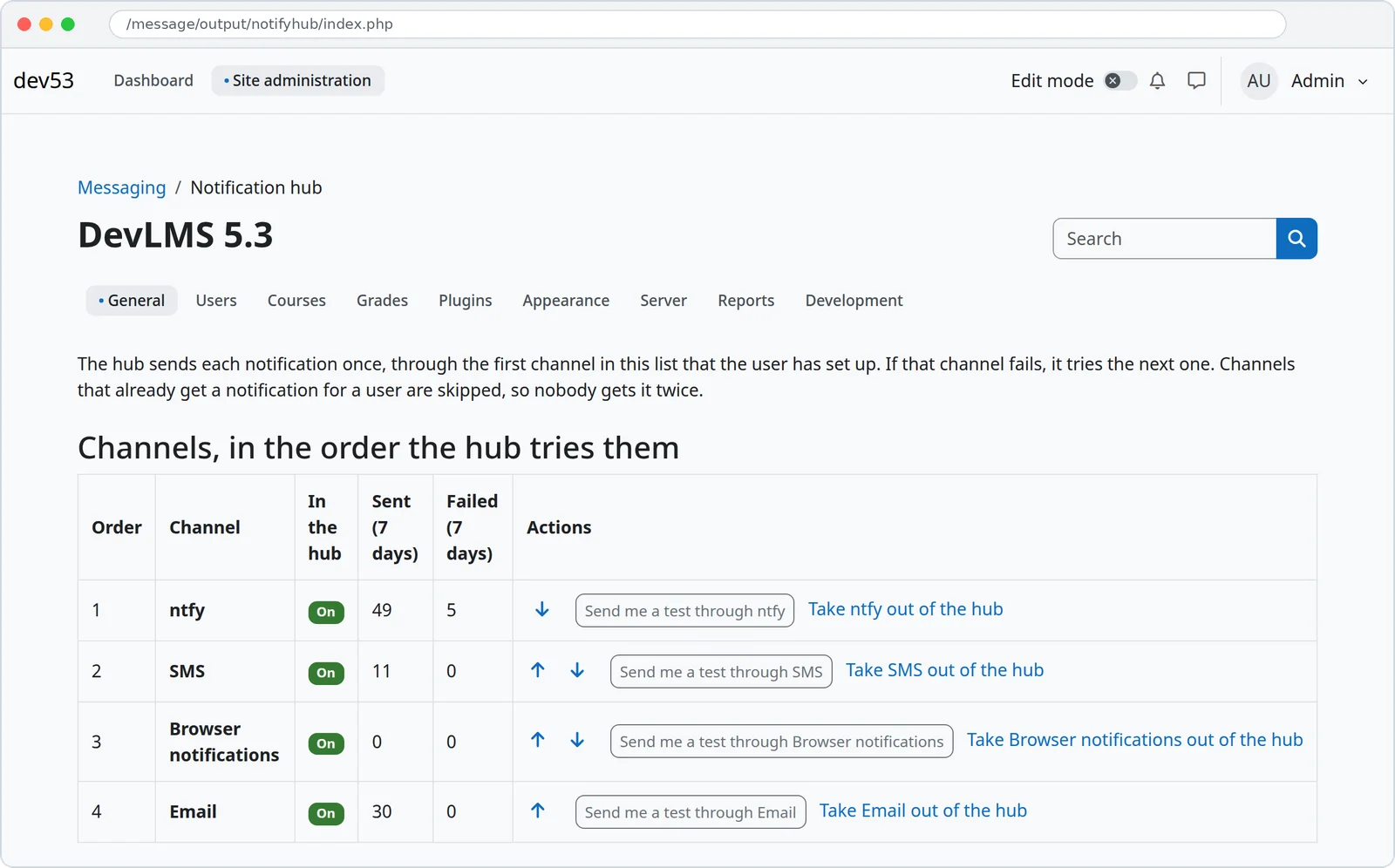
Put Browser notifications in the hub's channel order, for example the browser first, then SMS, then email. A student with a browser that confirms gets the pop-up and nothing else. A student whose browsers have gone quiet, or who never turned it on, gets the next channel. The hub can install this plugin for you after checking its checksum and signature.
How is it tested?
PHPUnit checks the encryption against the example in RFC 8291 byte for byte, VAPID signatures over 300 signings, a full decrypt of what Moodle sends, gone browsers removed, busy push services kept, a quiet browser no longer counting, Arabic text fitting the 4 KB limit and shown right to left, a real Moodle send, the web services and the privacy provider. Behat covers the browsers page, removing a browser, the quiet badge and an accessibility check. Then a real round trip in automated Firefox and Chrome on our test Moodle, including two students on one browser. CI runs on Moodle 4.5 to 5.3, on PostgreSQL and MariaDB.


Questions people ask
Can Moodle send notifications to the browser without the Moodle app?
Yes, with this plugin. Students turn on Browser notifications in each browser they use, and Moodle notifications then appear as pop-ups from the browser, even when Moodle is not open. It uses the Web Push standard that Chrome, Firefox, Edge and Safari support, so there is no app to install and no account with a push provider such as Firebase or OneSignal.
Which browsers does it work in?
We tested Firefox and Google Chrome end to end, in automated browsers on Linux: the browser turned notifications on, received an encrypted push from Moodle through Mozilla's and Google's push services, showed it and confirmed it. Edge and Safari on computers use the same standard but have not been tried yet. iPhone and iPad are not supported, because Apple only allows web push for sites added to the Home Screen as an app.
What happens when a student's browser is closed?
The push service keeps the notification for up to a day and delivers it when the browser comes back. Because a push service accepts a notification even when the browser is closed, the plugin asks each browser to confirm what it shows. A browser that has not confirmed one for over 3 days stops counting, and with the notification hub the student gets their notifications by email or another channel instead.
Can Google or Apple read our notifications?
No. Each notification is encrypted for one browser (RFC 8291) before it leaves Moodle, so the push service only sees an encrypted blob and the address of the browser. The plugin only sends to the push services of the major browsers, never to other addresses.
What about shared lab computers?
A browser belongs to the last student who turned notifications on in it, and the page tells students to turn it on only in their own browser. Students can see and remove every browser that gets their notifications.
Which Moodle versions does it support?
Moodle 4.5 to 5.3, on PHP 8.1 to 8.4, with PostgreSQL or MariaDB/MySQL. English, French and Arabic, with right-to-left notifications for Arabic.
Want it on your Moodle, with your logo and wording?
We install it, set it up with the notification hub, and adapt the notifications to your school, at a fixed price.
Get a fixed priceBacked by Ta9in.