
Our work / Open source
Final grade submission, for Moodle
Teachers check each course total and submit it. Submitted totals are locked in the gradebook. A head of department can approve them first. Every night the grades waiting to be sent go into one CSV file for your student records system, with new, changed and withdrawn grades marked. It is free and open source.
- 4.5 to 5.3 Moodle versions, on PHP 8.1 to 8.4
- GPL v3 free to use and change
- Alpha try it on a test site first
How do schools get final grades out of Moodle today?
Mostly by hand. The teacher exports the gradebook, someone cleans the spreadsheet, and the registrar uploads it to Banner, SITS or whatever the records system is. Grades change in Moodle after the spreadsheet was made and nobody notices. Universities that fixed this each built their own "submit final grades" button, and the open one we found, UCL's marks transfer, only talks to SITS. This plugin does the part every school needs: a clear submit step, a lock, an optional sign off, and a file the records system can load.
How does final grade submission work?
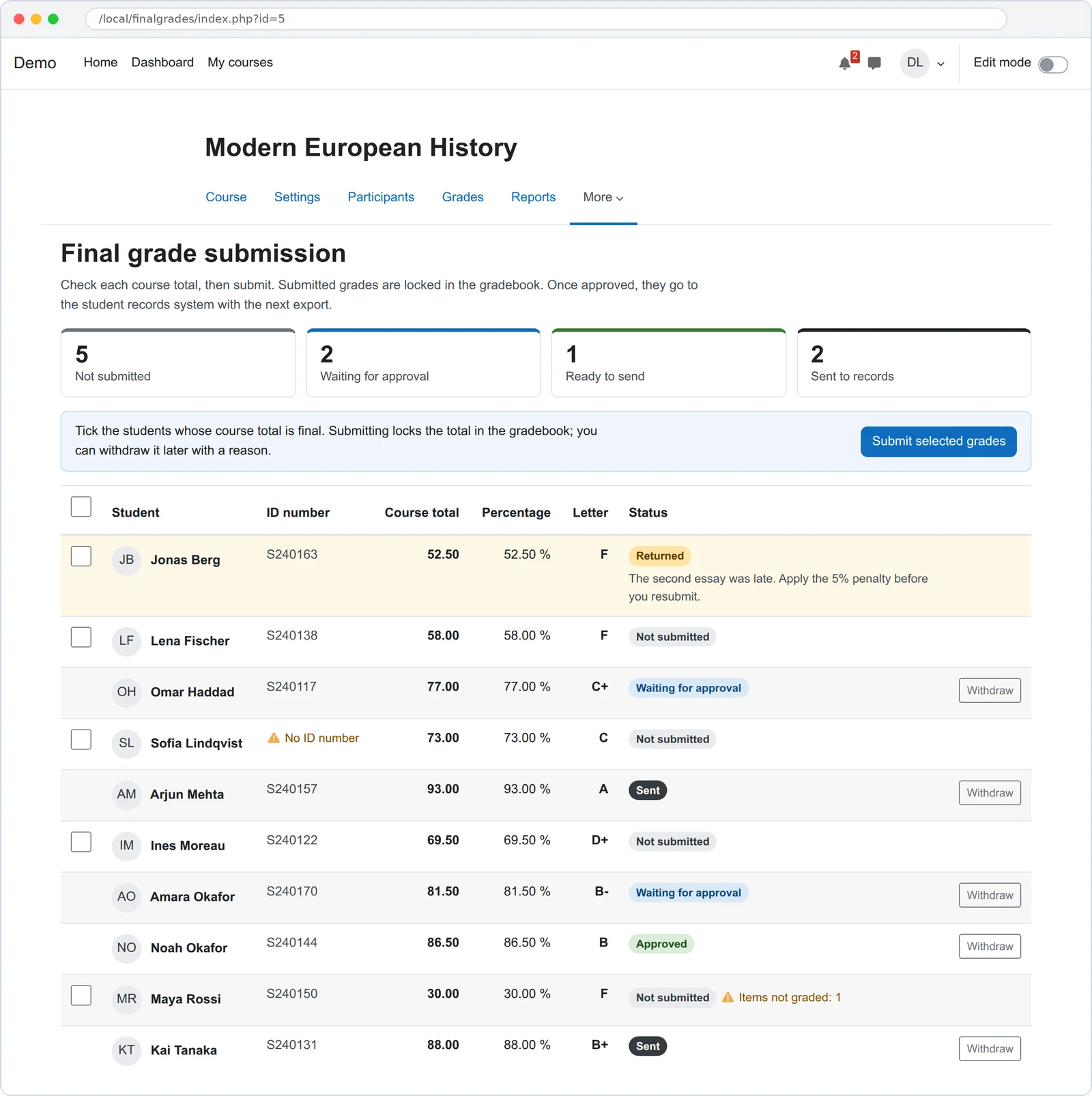
- Check. Open Final grades in the course menu. Each student's course total, percentage and letter are listed, with a warning for items not graded yet and for missing ID numbers.
- Submit. Tick the students whose total is final and submit. Their totals are locked in the gradebook, so a late change to an activity cannot move them.
- Approve. If your school wants a second pair of eyes, a head of department approves the grades or returns them to the teacher with a reason.
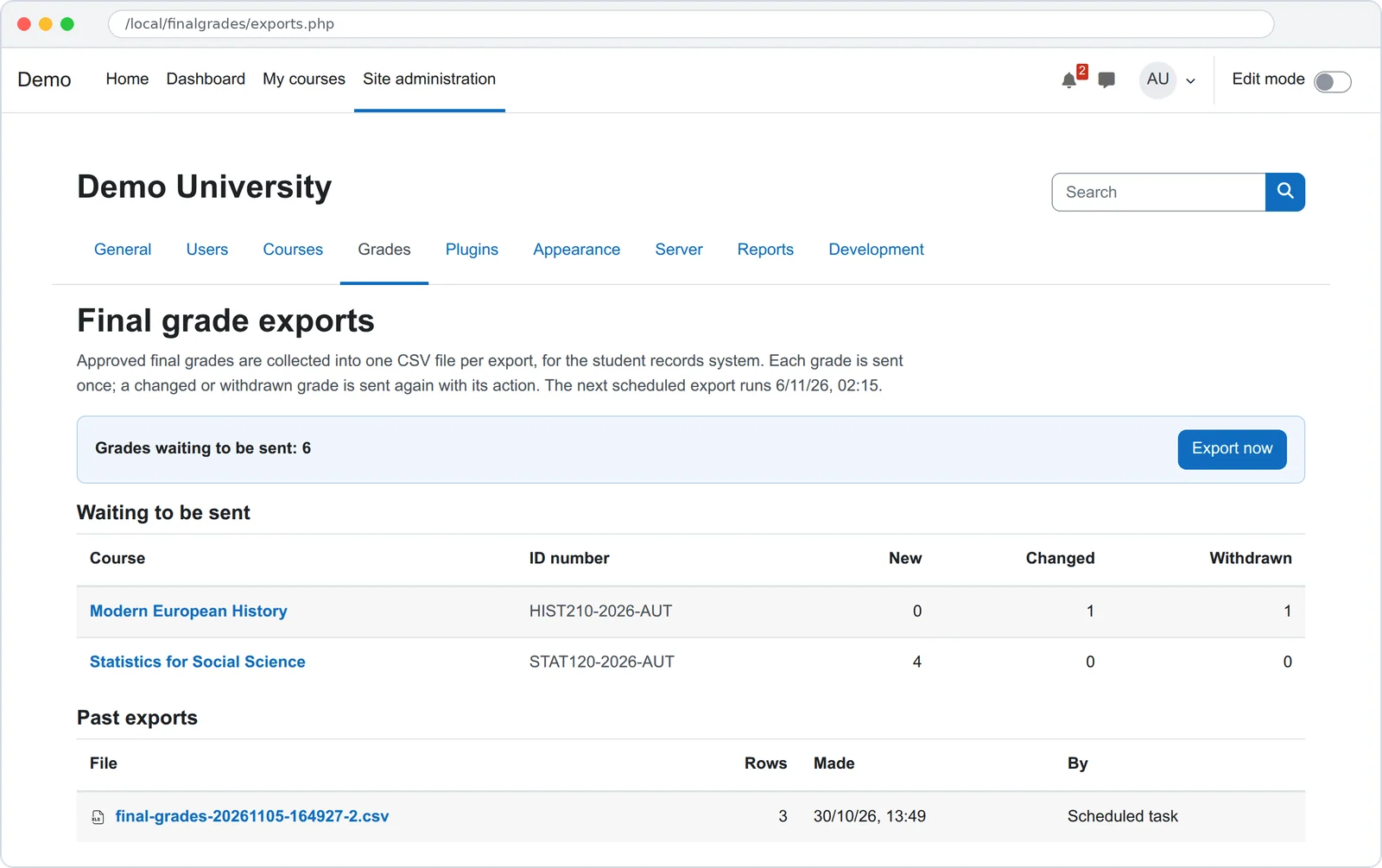
- Export. Every night the grades waiting to be sent go into one CSV file for the student records system. The registrar can also export now and download any past file.
- Fix. A teacher can withdraw a submitted grade with a reason. If it was already sent, the next file says so, and the corrected grade goes out as a change.
What is in the export file?
One CSV file per export, UTF-8, with a header line. Each grade is sent once. A grade withdrawn and
submitted again before the next export is one change line, not two.
| Column | Example |
|---|---|
action | new, change or withdrawn |
course_idnumber | HIST210-2026-AUT |
course_shortname | HIST210 |
student_idnumber | S240117 |
student_name | Omar Haddad |
grade | 77.00 |
percentage | 77.00 % |
letter | C+ |
submitted_by | Hana Lee |
submitted_at | 2026-10-30T12:46:00Z (UTC) |
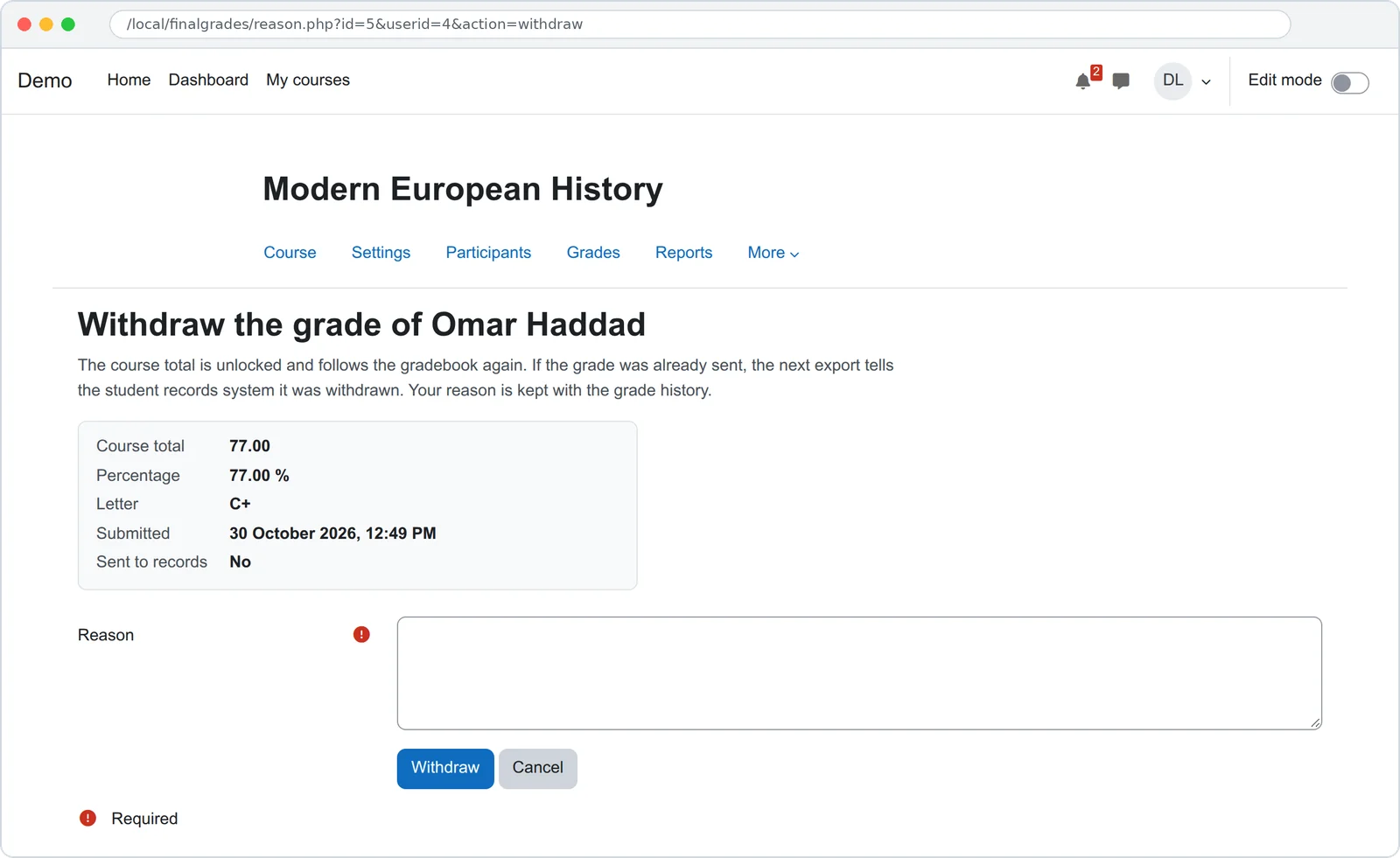
- Locked means locked. A submitted total does not move when an activity grade changes. Withdrawing unlocks it.
- Warnings before submit. Items not graded yet, a student without an ID number, a course without an ID number.
- Files stay in Moodle. Every export is kept for download. A drop folder on the server is optional.
- On the record. Every submission, approval, return, withdrawal and export is a Moodle log event, and the privacy tools export and delete it.
- Works with Autoflow. Those events can start an Autoflow workflow, for example to email the registrar when a course is fully submitted.
How is it tested?
PHPUnit covers the gradebook lock (a late activity change does not move a submitted total), submission, approval and return, the export file and its actions, the drop folder, the page data and the privacy provider. Behat walks a teacher through submitting and withdrawing and a registrar through an export, with Moodle's accessibility checks on every page. CI runs on Moodle 4.5 to 5.3, on PostgreSQL and MariaDB.


Questions people ask
How do teachers submit final grades from Moodle to the registrar?
Install the plugin and open Final grades in the course menu. Tick the students whose course total is final and press Submit selected grades. The totals are locked in the gradebook and go out in the next nightly CSV export, which the registrar downloads or picks up from a folder on the server.
Does submitting lock the grade in the Moodle gradebook?
Yes. The student's course total is locked, so changing an assignment or quiz grade afterwards does not move it. Withdrawing the submission, with a reason, unlocks it and the total follows the gradebook again.
What if a student has an exam that is not graded yet?
Moodle leaves empty grades out of the course total by default, so the total can look final while an exam is unmarked. The page shows how many items are not graded for each student before you submit.
Which student records systems does it work with?
Any system that can import a CSV file: Banner, SITS, PowerSchool, Colleague, Jenzabar or your own. The file uses the student and course ID numbers from Moodle. A direct connection to one system's API is not part of the plugin; we build that per institution.
Can a head of department approve grades before they are sent?
Yes. Turn on Require approval and give the approve permission to the head of department in a course category. Grades then wait until they are approved, and a returned grade goes back to the teacher with the reason.
What happens when a grade changes after it was sent?
The teacher withdraws it with a reason and submits the new total. The next export has one line for that student with the action change. If the grade is only withdrawn, the line says withdrawn.
Which Moodle versions does it support?
Moodle 4.5 to 5.3, on PHP 8.1 to 8.4, with PostgreSQL or MariaDB/MySQL.
Is it free?
Yes, open source under the GNU GPL v3. If you need it to push grades into your records system's API, upload by SFTP, or match your registrar's file layout, we build that at a fixed price.
Need it to talk to your records system?
A push to the Banner, SITS or PowerSchool API, an SFTP upload, your registrar's exact file layout, or grade change forms with sign off. We build that on top of this plugin at a fixed price.
Get a fixed priceBacked by Ta9in.